Backup & disaster recovery
Duplicati
Free encrypted incremental backup to just about any cloud storage.
open sourcedesktop
Independent reference — this page is a review. Duplicati is downloaded from the vendor’s official site, not from here.
| Platforms | Windows/macOS/Linux, web UI |
|---|---|
| Licence | Open source — MIT |
| Price | Free |
| Section | Backup & disaster recovery |
| Updated | 2026-11-05 |
What it is
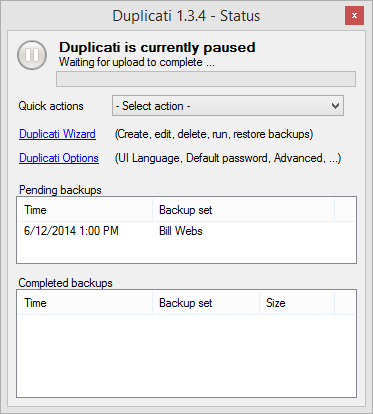
Free and open source, it writes encrypted, compressed, incremental backups to cloud storage — S3, B2, Google Drive, FTP, WebDAV. It’s a cheap route to offsite backup, with AES-256 and a web interface.
Problems it closes
- You want encrypted offsite backups to the cheap cloud storage you already pay for.
- Backups need to stay incremental to keep bandwidth and storage costs down.
- One machine, or a small handful, needs simple scheduled backup.
How administrators run it
- Point it at S3, Backblaze B2, Google Drive, FTP or WebDAV and set a schedule.
- Let it churn out AES-256 encrypted, compressed, deduplicated incrementals.
- Restore files from the web UI, and rehearse those restores regularly.
Strengths & trade-offs
Strengths
- Free and open source.
- Strong client-side encryption and plenty of cloud backends.
- Deduplicated incrementals keep storage and bandwidth low.
Trade-offs
- Built for files, not full disk images.
- Version 2 has worn a beta label for years, so test your restores.
Common questions
Does it make image backups?
No — it does file and folder backup. For full disk images, reach for Macrium or Veeam.
Is data encrypted before it leaves the machine?
Yes — encrypted client-side with AES-256 before upload.
Alternatives
Bareos Open-source client-server backup at enterprise scale — disk, tape or cloud. open sourcedesktop Linux server; clients for Linux/Windows/macOS/BSD/Solaris/AIX; web UI Macrium Reflect Disk imaging and partition backup on Windows, bare-metal recovery included. paiddesktop Windows only (desktop + Server) Veeam Backup & Replication Enterprise backup and replication across virtual, physical and cloud workloads. freemiumdesktop Windows console; protects VMware/Hyper-V/Nutanix/Proxmox, physical servers, cloud, M365